Your Tempur-Pedic mattress serial number is essential for warranty registration, customer service support, and verifying product authenticity. Without this unique identifier, you’ll struggle to access warranty benefits or prove ownership when contacting Tempur-Pedic. Many owners waste hours searching for this critical information because labels are often hidden along mattress sides or obscured by bedding. This guide provides proven methods to locate your Tempur-Pedic serial number in under 10 minutes—no matter how deeply it’s buried in your mattress design.
The serial number typically appears as a 10-20 character combination of letters and numbers, often beginning with “TP” or “T” prefixes that indicate the model line. Unlike model numbers which follow recognizable product names like “TEMPUR-ProAdapt,” serial numbers are pure alphanumeric sequences designed specifically for product identification. Let’s explore exactly where to look and what to do if you can’t find it.
Locate the White Side Panel Label Immediately
Your Tempur-Pedic mattress almost certainly has a white manufacturer label attached directly to the side panel, usually positioned near a corner or along the longer edges. This is the most reliable source for your serial number and should be your first search location. Check the right-hand side of the mattress when facing the foot of the bed—this is where most models place the label, though some newer designs may position it on the left side.
Pull Back Bedding to Expose the Entire Side Panel
Don’t just glance at the visible portion near the headboard—Tempur-Pedic sometimes positions labels low near the foundation or higher up depending on mattress depth. For pillow-top or thicker models, the label may be positioned differently than traditional profiles. Carefully lift each corner of your mattress (with a partner if needed) to expose the full side panel without damaging your bedding.
When you find the rectangular white label, look for text marked “S/N,” “Serial No.,” or a barcode with numbers beneath it. The serial number appears as a scannable barcode accompanied by human-readable numbers printed in black ink. If you see multiple number sequences, the one with the barcode is almost certainly your serial number—model numbers typically include recognizable product line names while serial numbers are pure alphanumeric.
Check Original Packaging Before Discarding Boxes
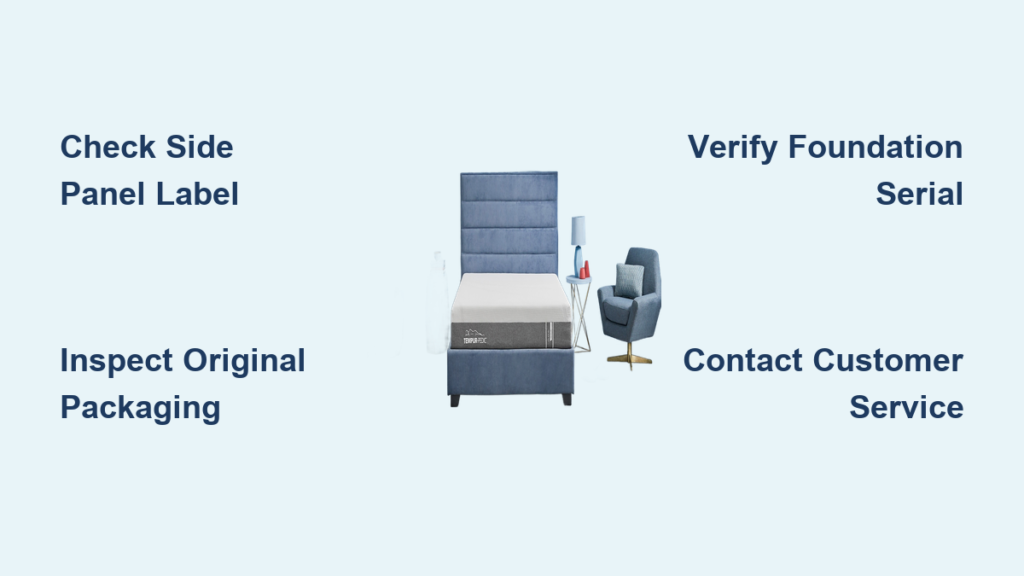
Your Tempur-Pedic mattress box contains a duplicate serial number on the white shipping label, usually positioned on one of the long sides or top flaps. If you haven’t thrown away the box yet, this might be the easiest way to access the serial number without moving your mattress or searching around bed frames.
Peel Back Retailer Stickers to Find Manufacturer Labels
Many retailers apply their own shipping labels over Tempur-Pedic’s original label, so you may need to carefully peel back or look around these stickers. The Tempur-Pedic label typically includes both shipping information and the serial number with matching barcode. Take a clear photograph of this label for your records before disposing of the packaging—this simple step could save you hours of frustration years later when you need warranty service.
Identify Foundation and Base Serial Numbers
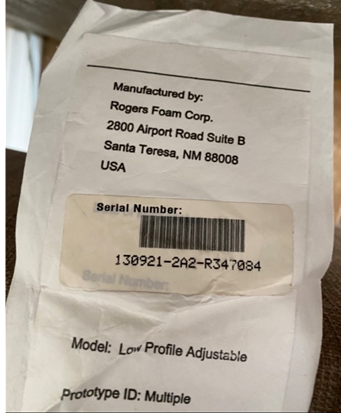
If you purchased your Tempur-Pedic mattress with a matching foundation or adjustable base, these components have their own serial numbers that work in conjunction with your mattress number. For Tempur-Pedic Ergo adjustable bases, flip the base over to find the serial number on the underside near the motor assembly or control unit.
Document All Component Serial Numbers Together
When contacting customer service, you’ll need to provide serial numbers for all components to ensure compatibility with replacement parts. Foundations typically have labels attached to their side panels following similar placement rules as the mattress label. Keep a single record that correlates each serial number with its specific component—this prevents confusion during warranty claims and speeds up service requests significantly.
Search Digital Records Before Physical Documents
Before digging through filing cabinets, check your email for purchase confirmations from the retailer. Online retailers typically send order confirmations with product details including model numbers that can help narrow your search. If you purchased from a physical store, check your email for digital receipts or order confirmations.
Register Your Mattress Online for Permanent Access
Create a Tempur-Pedic account on their official website to register your mattress. The registration process takes just minutes but provides permanent digital access to your serial number without needing to locate physical labels. Once registered, your product information appears in your account dashboard—accessible anytime from any device. This also ensures you receive important notifications about warranty information and product recalls.
Distinguish Serial Number from Model Number Quickly
Many Tempur-Pedic owners confuse model numbers with serial numbers, causing unnecessary delays when contacting customer service. The serial number is almost always longer (10-20 characters) and appears beside a barcode, while model numbers include recognizable product names like “TEMPUR-LuxeAdapt.”
Look for prefixes like “TP” or “T” at the beginning of the number sequence—these identify Tempur-Pedic-specific identifiers. If you see “S/N” or “Serial No.” printed before a number sequence, that’s your target. When in doubt, photograph the entire label and send it to Tempur-Pedic customer service—they can immediately identify which number you need.
Handle Faded or Damaged Labels with These Techniques

Mattress labels can fade over time due to light exposure or become partially torn from regular use. If your label is partially legible, document what you can see clearly and contact Tempur-Pedic customer service—representatives often recognize partial serial numbers when combined with purchase date and model information.
For completely illegible labels, try these techniques:
– Shine a flashlight at a low angle across the label to reveal faint impressions
– Use your smartphone’s camera zoom function to capture details invisible to the naked eye
– Photograph the label in different lighting conditions (natural light often works best)
Create Permanent Serial Number Records Today
Once you locate your serial number, create multiple backup records using this simple system:
- Take three clear smartphone photos of the serial number label (close-up, medium, and wide shots showing context)
- Store photos in at least two locations: cloud storage plus email or physical drive
- Write the serial number in your owner’s manual along with purchase date and retailer information
- Create a dedicated home inventory document that includes all major appliance and furniture serial numbers
This four-point system ensures you’ll never lose access to your serial number, even if your mattress label disappears completely. I’ve seen countless customers struggle with warranty claims simply because they didn’t take 60 seconds to record this critical information when their mattress was new.
Contact Tempur-Pedic Support with These Details
When calling customer service, having this information ready cuts your hold time in half:
- Your contact information and address at time of purchase
- Approximate purchase date (month/year is sufficient)
- Retailer name where you purchased the mattress
- Model name from the label (e.g., “TEMPUR-Cloud”)
- Any partial serial number you can read
Phone support typically resolves serial number inquiries faster than email or chat—Tempur-Pedic’s customer service line is 1-800-821-6621 (available Monday-Friday, 8am-8pm EST). When you call, specifically request “warranty department” for the most knowledgeable representatives regarding serial number verification.
Verify Warranty Status While You Have the Number
Once you’ve located your serial number, immediately check your warranty status—Tempur-Pedic offers different coverage periods depending on your specific model. The manufacturing date encoded near your serial number determines your warranty expiration—most models offer 10-year limited warranties but some premium lines have extended coverage.
When registering your product online, the system automatically calculates your warranty expiration date based on manufacturing date. This information appears in your account dashboard, allowing you to plan for potential future service needs well before coverage ends.
Troubleshoot Missing Serial Numbers Effectively
If you’ve exhausted all methods and still can’t find your serial number, try these last-resort solutions:
- Contact your original retailer—they often maintain purchase records with serial numbers
- Check credit card statements for purchase details that might include product information
- Search your email for “Tempur-Pedic” to find order confirmations or shipping notifications
- If you registered the product previously, Tempur-Pedic’s system may have your serial number on file
Tempur-Pedic customer service can sometimes verify your product using just the model name, purchase date, and retailer information—though having the serial number always speeds up the process significantly.
Finding your Tempur-Pedic mattress serial number shouldn’t be a mystery. By checking the white side panel label first, verifying original packaging, documenting all component numbers, and creating permanent records, you’ll always have this critical information when needed. Take just 10 minutes today to locate and record your serial number—this small investment of time will save you hours of frustration during any future warranty claim or customer service interaction. Your future self will thank you when you need to access warranty benefits without the stress of hunting for hidden labels.